Toote informatsioon
Tootekirjeldus inglise keeles:
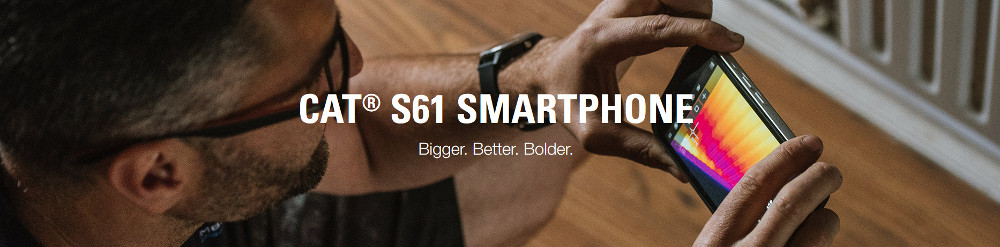
Integrated Thermal Imaging Camera
Use the integrated thermal imaging camera of the Cat S61 to monitor and diagnose problems more quickly and save time on site.
Locate a heat source up to 400°C, even in complete darkness, and diagnose damp, draught, leak, a short or blockages.
Just tap the MyFLIR app on the device to get started.
Laser Assisted Distance Measure
Measure distances and area using the Measure app on the Cat S61. Safely document measurements and record the layout of an area all in one screen, helping to make work estimates quicker and easier. Tap the Measure app on the device to get going.
Indoor Air Quality Monitor
The handy Air app measures the quality of the air you are working in when indoors.
It will alert you to unhealthy levels of indoor air pollutants, like paints and solvents,
and provides temperature and humidity readings.
Thermal imaging camera
The integrated FLIR® thermal imaging camera on the Cat S60 and the latest Cat S61 smartphones can be used to monitor and diagnose problems more quickly and save time on site. It provides a new perspective and opens up new use cases, including: detecting heat loss around windows and doors; spotting moisture and missing insulation; identifying over-heating electrical appliances and circuitry; and seeing in complete darkness.
The upgrades on the new Cat S61 include an expanded measurable temperature range to 400º Celsius compared to 120º Celsius on the Cat S60, and an upgrade from VGA to HD detail from the visible camera providing unmatched image optimization using FLIR’s MSX® technology.
Just tap the MyFLIR app on the device to get started.
USING THE THERMAL IMAGE CAMERA
The Cat S60 and Cat S61 smartphones detect invisible heat energy up to 100 ft away and capture and measure any changes in temperature as a thermal image or video. Both smartphones use the visible camera and the thermal imaging camera together while FLIR’s patented MSX technology overlays the images on top of each other to create a crisper and more recognizable image with greater detail.
Thermal imaging can be used for real time problem solving, from finding a leak, a gap in insulation, an electrical fault to locating livestock in the dark and everything in between. Thermal imaging cameras, however, cannot pick up heat signatures on some objects like reflective materials and water and whilst they can see through obscurants like smoke they cannot see through walls, rather detect changes in temperature caused by objects behind the wall.
Getting the most out of thermal imaging
The MyFLIR app on both the Cat S60 and Cat S61 allows you to shoot stills, video and timelapse videos in a file format that can be immediately shared via email from the device. Apply movable spot meters and and highlight an area within the image to see temperature differences to both live images and retrospectively to the thermal images saved in your gallery. You can also select custom temperature scales to highlight objects within a specific range.
The Cat S61 also has a new Tips and Tricks section within the app and a Community Forum to help get the most out of its thermal imaging capabilities. Both the Cat S60 and Cat S61 have 9 different colour palletes to choose from when capturing thermal images. For example try 'Hottest' to quickly identify an overheating fuse in a circuit or 'Coldest' to view levels of fluid inside tanks.
The integrated thermal camera on the Cat S61 and S61 smartphones ensure thermal imaging technology is always on you, always charged and protected within a rugged device, pushing the boundaries of mobile technology, how and where it's used.
Distance and Area Measuring
The Measure app on the Cat® S61 uses the device's in-built laser and rear camera to establish depth and calculate distances. It can be used to measure the distance from the device to a surface, and to estimate areas on that same surface. It can be used to calculate quotes or the materials needed for wall tiling, wallpapering or painting jobs, flooring or skirting board fitting, running piping or cable, or for preparing floor plans.
The Measure app helps you to capture images on site that can then be used later to estimate sizes and dimensions. It's a convenient way to take on-the-job measurement estimates, without a tape measure.
Using the Measure App
You can use the Measure app on the Cat S61 to measure distances with a tolerance of up to +/- 3%.
The app can be set to show either metric (metres and centimetres) or imperial (feet and inches) units of measure.
Measurement estimates are made using the device's in-built laser and rear camera, so images are captured when measurements are taken. You can revisit a measurement taken earlier, and even take further measurements of the scene.
It's the perfect tool for tradesmen, DIY enthusiasts, interior designers, estate agents or realtors, home insurance assessors, and many other professions.
How To Use the Measure App
To maintain the accuracy of measurements, it is important that the laser/camera alignment of the Cat S61 is calibrated regularly. This will need to be done at first use and should be done frequently using the Measure app's calibration process.
The calibration process is simple to complete. You'll need to manually measure a height or distance using a tape measure and input that information. The app then takes a measurement over this known distance, allowing it to calibrate the laser/camera alignment against the known value. This is then used as the baseline for other measurements taken using the Measure app.
You will be automatically prompted to complete the calibration process the first time you start the Measure app on your Cat S61. You can then recalibrate whenever convenient by selecting Calibrate from the app menu.
For best results:
- Use a height or distance of at least 1 metre for the calibration process.
- Using the same height or distance for calibration repeatedly means you do not need to manually re-measure each time.
- It is advisable to recalibrate the Measure app whenever the S61 has been dropped of more than 1 metre / 3 feet.
MEASURE HUMIDITY AND AMBIENT AIR TEMPERATURE
Get useful temperature and humidity readings with the integrated indoor air quality monitor of the Cat® S61 smartphone. With the Air app on the device, you can quickly understand the moisture levels in your working environment. It is useful for rooms without an extractor fan, or regular ventilation, and where opening a window alone doesn't always completely remove all the moisture. You can also use it to help you understand when a freshly plastered wall is ready to paint.
Be Aware of Indoor Air Quality
Use the Cat S61's in-built indoor air quality sensor to monitor the air conditions around you.
The Air app shows you the detected level of indoor air pollutants (VOCs), commonly found in products such as solvents, glues, paints, and cleaning agents. The sensor checks the air quality every four seconds, when activated, and can alert you with a notification when VOCs hit unhealthy levels. This allows you to take simple steps to reduce your exposure: improve the ventilation by opening doors and windows or turning on air conditioning, or take a short break.
Which Indoor Air Pollutants Can the S61 Monitor?
Indoor air pollutants, or more specifically Volatile Organic Compounds (VOCs), include a large range of chemicals and substances.
The Cat S61's indoor air quality sensor has been tuned to detect the most common VOCs that tradesmen, such as plumbers, carpenters, painters, decorators, builders, and electricians might be exposed to. These include paints, solvents, glues and adhesives, carpets, furnishings, cosmetics, and cleaning agents.
Prolonged exposure to VOCs can result in a range of health issues, including headaches and dizziness, irritation to the eyes, skin, nose and throat, and respiratory problems.
Note: The Air app is not a tool for checking whether an area is safe. It is unable to detect individual gas or vapours like smoke, asbestos or carbon monoxide. Instead, it is a tool for providing you with better information to help reduce your exposure to VOCs.
Integrated Thermal Imaging Camera
Use the integrated thermal imaging camera of the Cat S61 to monitor and diagnose problems more quickly and save time on site.
Locate a heat source up to 400°C, even in complete darkness, and diagnose damp, draught, leak, a short or blockages.
Just tap the MyFLIR app on the device to get started.
Laser Assisted Distance Measure
Measure distances and area using the Measure app on the Cat S61. Safely document measurements and record the layout of an area all in one screen, helping to make work estimates quicker and easier. Tap the Measure app on the device to get going.
Indoor Air Quality Monitor
The handy Air app measures the quality of the air you are working in when indoors.
It will alert you to unhealthy levels of indoor air pollutants, like paints and solvents,
and provides temperature and humidity readings.
Thermal imaging camera
The integrated FLIR® thermal imaging camera on the Cat S60 and the latest Cat S61 smartphones can be used to monitor and diagnose problems more quickly and save time on site. It provides a new perspective and opens up new use cases, including: detecting heat loss around windows and doors; spotting moisture and missing insulation; identifying over-heating electrical appliances and circuitry; and seeing in complete darkness.
The upgrades on the new Cat S61 include an expanded measurable temperature range to 400º Celsius compared to 120º Celsius on the Cat S60, and an upgrade from VGA to HD detail from the visible camera providing unmatched image optimization using FLIR’s MSX® technology.
Just tap the MyFLIR app on the device to get started.
USING THE THERMAL IMAGE CAMERA
The Cat S60 and Cat S61 smartphones detect invisible heat energy up to 100 ft away and capture and measure any changes in temperature as a thermal image or video. Both smartphones use the visible camera and the thermal imaging camera together while FLIR’s patented MSX technology overlays the images on top of each other to create a crisper and more recognizable image with greater detail.
Thermal imaging can be used for real time problem solving, from finding a leak, a gap in insulation, an electrical fault to locating livestock in the dark and everything in between. Thermal imaging cameras, however, cannot pick up heat signatures on some objects like reflective materials and water and whilst they can see through obscurants like smoke they cannot see through walls, rather detect changes in temperature caused by objects behind the wall.
Getting the most out of thermal imaging
The MyFLIR app on both the Cat S60 and Cat S61 allows you to shoot stills, video and timelapse videos in a file format that can be immediately shared via email from the device. Apply movable spot meters and and highlight an area within the image to see temperature differences to both live images and retrospectively to the thermal images saved in your gallery. You can also select custom temperature scales to highlight objects within a specific range.
The Cat S61 also has a new Tips and Tricks section within the app and a Community Forum to help get the most out of its thermal imaging capabilities. Both the Cat S60 and Cat S61 have 9 different colour palletes to choose from when capturing thermal images. For example try 'Hottest' to quickly identify an overheating fuse in a circuit or 'Coldest' to view levels of fluid inside tanks.
The integrated thermal camera on the Cat S61 and S61 smartphones ensure thermal imaging technology is always on you, always charged and protected within a rugged device, pushing the boundaries of mobile technology, how and where it's used.
Distance and Area Measuring
The Measure app on the Cat® S61 uses the device's in-built laser and rear camera to establish depth and calculate distances. It can be used to measure the distance from the device to a surface, and to estimate areas on that same surface. It can be used to calculate quotes or the materials needed for wall tiling, wallpapering or painting jobs, flooring or skirting board fitting, running piping or cable, or for preparing floor plans.
The Measure app helps you to capture images on site that can then be used later to estimate sizes and dimensions. It's a convenient way to take on-the-job measurement estimates, without a tape measure.
Using the Measure App
You can use the Measure app on the Cat S61 to measure distances with a tolerance of up to +/- 3%.
The app can be set to show either metric (metres and centimetres) or imperial (feet and inches) units of measure.
Measurement estimates are made using the device's in-built laser and rear camera, so images are captured when measurements are taken. You can revisit a measurement taken earlier, and even take further measurements of the scene.
It's the perfect tool for tradesmen, DIY enthusiasts, interior designers, estate agents or realtors, home insurance assessors, and many other professions.
How To Use the Measure App
To maintain the accuracy of measurements, it is important that the laser/camera alignment of the Cat S61 is calibrated regularly. This will need to be done at first use and should be done frequently using the Measure app's calibration process.
The calibration process is simple to complete. You'll need to manually measure a height or distance using a tape measure and input that information. The app then takes a measurement over this known distance, allowing it to calibrate the laser/camera alignment against the known value. This is then used as the baseline for other measurements taken using the Measure app.
You will be automatically prompted to complete the calibration process the first time you start the Measure app on your Cat S61. You can then recalibrate whenever convenient by selecting Calibrate from the app menu.
For best results:
- Use a height or distance of at least 1 metre for the calibration process.
- Using the same height or distance for calibration repeatedly means you do not need to manually re-measure each time.
- It is advisable to recalibrate the Measure app whenever the S61 has been dropped of more than 1 metre / 3 feet.
MEASURE HUMIDITY AND AMBIENT AIR TEMPERATURE
Get useful temperature and humidity readings with the integrated indoor air quality monitor of the Cat® S61 smartphone. With the Air app on the device, you can quickly understand the moisture levels in your working environment. It is useful for rooms without an extractor fan, or regular ventilation, and where opening a window alone doesn't always completely remove all the moisture. You can also use it to help you understand when a freshly plastered wall is ready to paint.
Be Aware of Indoor Air Quality
Use the Cat S61's in-built indoor air quality sensor to monitor the air conditions around you.
The Air app shows you the detected level of indoor air pollutants (VOCs), commonly found in products such as solvents, glues, paints, and cleaning agents. The sensor checks the air quality every four seconds, when activated, and can alert you with a notification when VOCs hit unhealthy levels. This allows you to take simple steps to reduce your exposure: improve the ventilation by opening doors and windows or turning on air conditioning, or take a short break.
Which Indoor Air Pollutants Can the S61 Monitor?
Indoor air pollutants, or more specifically Volatile Organic Compounds (VOCs), include a large range of chemicals and substances.
The Cat S61's indoor air quality sensor has been tuned to detect the most common VOCs that tradesmen, such as plumbers, carpenters, painters, decorators, builders, and electricians might be exposed to. These include paints, solvents, glues and adhesives, carpets, furnishings, cosmetics, and cleaning agents.
Prolonged exposure to VOCs can result in a range of health issues, including headaches and dizziness, irritation to the eyes, skin, nose and throat, and respiratory problems.
Note: The Air app is not a tool for checking whether an area is safe. It is unable to detect individual gas or vapours like smoke, asbestos or carbon monoxide. Instead, it is a tool for providing you with better information to help reduce your exposure to VOCs.
Koos ostetud