Toote informatsioon
Eizo FlexScan EV2316W
Toote kirjeldus inglise keeles:
Toote kirjeldus inglise keeles:
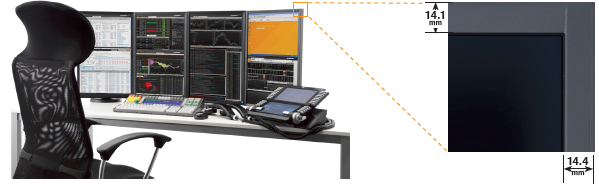
Slim Bezels
A new thin bezel design saves space on the desktop and minimizes eye movement between screens in a multi-monitor environment.
Ergonomic Stand
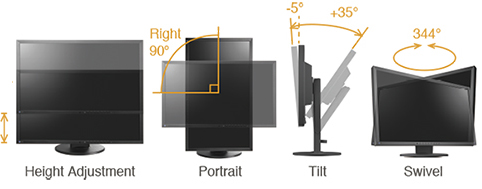
Adjust the screen to your ideal viewing position with EIZO’s versatile FlexStand.
Getting Connected
Three input terminals are included for connecting to PCs. In addition, a USB hub and headphone/ audio jacks are conveniently located on the side of the monitor.

Flicker-Free Images
Due to the way brightness is controlled on LED backlights, a small number of people perceive flicker on their screen which causes eye fatigue. The FlexScan EV series utilizes a hybrid solution to regulate brightness and make flicker unperceivable without any drawbacks like compromising color stability.
A Clear View from All Angles
The FlexScan EV2316W has 170° horizontal and 160° vertical viewing angles which makes it suitable for most business use. For viewing environments where the monitor is placed above eye level, an "Up View" function minimizes any washing out of colors that may occur when looking up to view the screen.
 Tireless Eyes
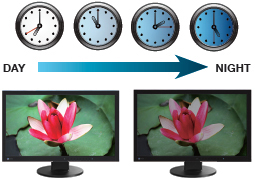
To prevent eye fatigue, a brightness sensor called Auto EcoView detects the changes in the ambient brightness that occur throughout the day and automatically adjusts the screen to the ideal brightness level. Auto EcoView cuts power by almost 40% compared to operating the monitor at maximum brightness
Adjustable to Just 1% of Maximum Brightness
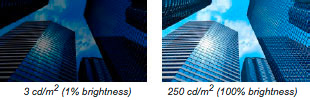
In a dimly-lit work environment, a monitor with low brightness settings will be more comfortable to use. This monitor comes with an LED backlight that allows for adjusting the brightness to just 1% (about 3 cd/m2) of the maximum. With typical CCFL backlights the lowest you could adjust to would be a much brighter 20%.
Preset Modes for Optimum Viewing
Five preset modes (including two with user adjustable settings) ensure you always get the right setting for any application. You can switch modes at the touch of a button or automatically with the bundled ScreenManager Pro for LCD software.
Paper Mode and EyeCare Filter Reduce Eye Fatigue
The Paper mode preset simulates the look of printed paper and helps prevent eyestrain when reading documents. When used with EyeCare Filter (available with the bundled ScreenManager Pro software), any of several filter patters that resemble different types of paper can be applied. You can adjust the density of the filter patterns for maximum viewing comfort.
Smooth Playback of Moving Images
An overdrive circuit reduces gray-to-gray response time to just 6 ms to ensure that moving images look clean and sharp.
LED Backlights – Less Power, Longer Life
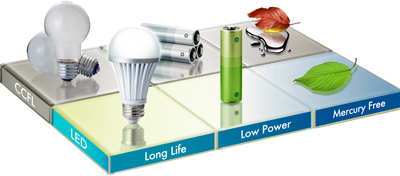
Compared to conventional CCFL backlights, LED backlights last longer and consume less power. They are also mercury-free to have minimal impact on the environment when they are eventually disposed of.
Reduce Power by up to 30%
A new feature called EcoView Optimizer 2 saves energy by up to 30% by reducing the backlight brightness and increasing the gain. To maintain image quality, EcoView Optimizer 2 only boosts the gain with a screen consisting mostly of dark content because the accompanying reduction in brightness is almost unperceivable.
Presence Sensor for Energy Savings
A presence sensor called EcoView Sense 2 prompts the monitor to switch to power save mode when you are absent and then power on again when you return. It even works in a multi-monitor setup so all monitors remain on when you're at your desk
A new thin bezel design saves space on the desktop and minimizes eye movement between screens in a multi-monitor environment.
Ergonomic Stand
Adjust the screen to your ideal viewing position with EIZO’s versatile FlexStand.
Getting Connected
Three input terminals are included for connecting to PCs. In addition, a USB hub and headphone/ audio jacks are conveniently located on the side of the monitor.
Flicker-Free Images
Due to the way brightness is controlled on LED backlights, a small number of people perceive flicker on their screen which causes eye fatigue. The FlexScan EV series utilizes a hybrid solution to regulate brightness and make flicker unperceivable without any drawbacks like compromising color stability.
A Clear View from All Angles
The FlexScan EV2316W has 170° horizontal and 160° vertical viewing angles which makes it suitable for most business use. For viewing environments where the monitor is placed above eye level, an "Up View" function minimizes any washing out of colors that may occur when looking up to view the screen.
Tireless EyesTo prevent eye fatigue, a brightness sensor called Auto EcoView detects the changes in the ambient brightness that occur throughout the day and automatically adjusts the screen to the ideal brightness level. Auto EcoView cuts power by almost 40% compared to operating the monitor at maximum brightness
Adjustable to Just 1% of Maximum Brightness
In a dimly-lit work environment, a monitor with low brightness settings will be more comfortable to use. This monitor comes with an LED backlight that allows for adjusting the brightness to just 1% (about 3 cd/m2) of the maximum. With typical CCFL backlights the lowest you could adjust to would be a much brighter 20%.
Preset Modes for Optimum Viewing
Five preset modes (including two with user adjustable settings) ensure you always get the right setting for any application. You can switch modes at the touch of a button or automatically with the bundled ScreenManager Pro for LCD software.
Paper Mode and EyeCare Filter Reduce Eye Fatigue
The Paper mode preset simulates the look of printed paper and helps prevent eyestrain when reading documents. When used with EyeCare Filter (available with the bundled ScreenManager Pro software), any of several filter patters that resemble different types of paper can be applied. You can adjust the density of the filter patterns for maximum viewing comfort.
Smooth Playback of Moving Images
An overdrive circuit reduces gray-to-gray response time to just 6 ms to ensure that moving images look clean and sharp.
LED Backlights – Less Power, Longer Life
Compared to conventional CCFL backlights, LED backlights last longer and consume less power. They are also mercury-free to have minimal impact on the environment when they are eventually disposed of.
Reduce Power by up to 30%
A new feature called EcoView Optimizer 2 saves energy by up to 30% by reducing the backlight brightness and increasing the gain. To maintain image quality, EcoView Optimizer 2 only boosts the gain with a screen consisting mostly of dark content because the accompanying reduction in brightness is almost unperceivable.
Presence Sensor for Energy Savings
A presence sensor called EcoView Sense 2 prompts the monitor to switch to power save mode when you are absent and then power on again when you return. It even works in a multi-monitor setup so all monitors remain on when you're at your desk
Koos ostetud

TOP toode