Toote informatsioon
Eizo FlexScan EV2450
Toote kirjeldus inglise keeles:
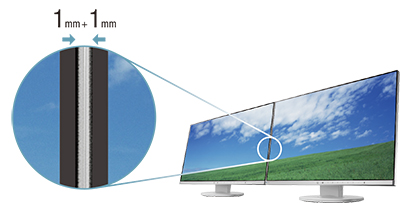
World’s Thinnest Bezels for Multi-Monitor Environments
The monitor features 1 mm ultra-slim bezels on the sides and top with black borders of 4.3 mm and a depth of a mere 47.9 mm. This makes for an attractive design that blends in with the desktop and reduces eye movement in a multi-monitor setup.
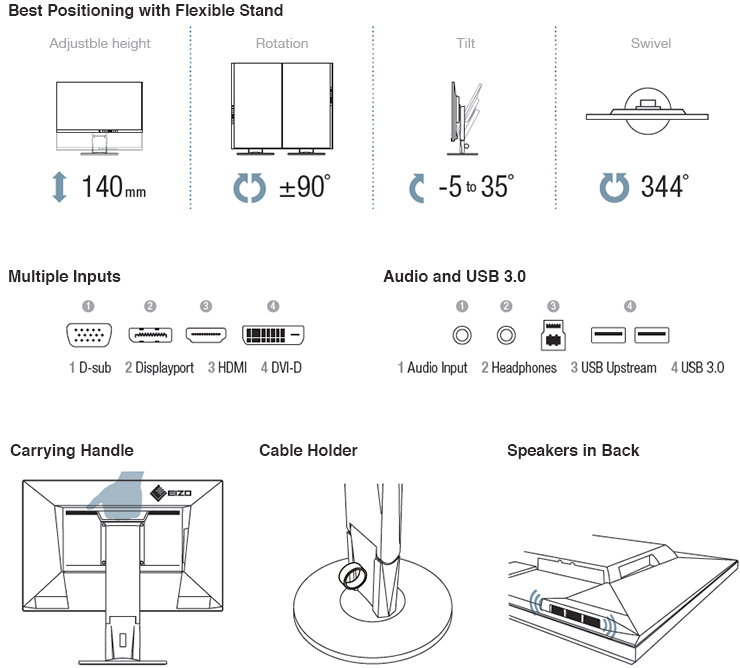
Clear View From All Angles
The monitor uses an LED-backlit IPS (in-plane switching) LCD panel with 178° viewing angle that minimizes color shift and contrast changes when viewing the screen at an angle.
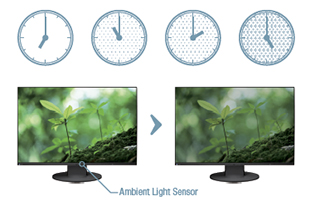
Auto Brightness Control
To prevent eye fatigue, a brightness sensor called Auto EcoView detects the changes in the ambient brightness that occurs throughout the day and automatically adjusts the screen to the ideal brightness level.
Flicker-Free Images
Due to the way brightness is controlled on LED backlights, a small number of people perceive flicker on their screen which causes eye fatigue. The FlexScan EV series utilizes a hybrid solution to regulate brightness and make flicker unperceivable without any drawbacks like compromising color stability.
Less Blue Light Reduces Eye Fatigue
In the visible light spectrum, blue light has wave lengths adjacent to ultraviolet light. Compared to the factory preset setting of 6,500 K of typical LCD monitors, Paper Mode is closer to the spectral distribution with long reddish wavelengths so it reduces the amount of blue light, a cause of eye fatigue, and helps prevent eyestrain when reading documents.
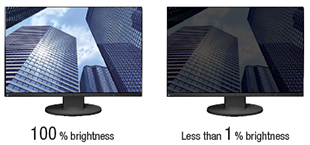
Adjustable to Less Than 1% of Maximum Brightness
In a dimly-lit work environment, a monitor with low brightness settings is more comfortable to use. With its LED backlight, the monitor is adjustable to 1 cd/m²
which is less than 1% of the maximum.
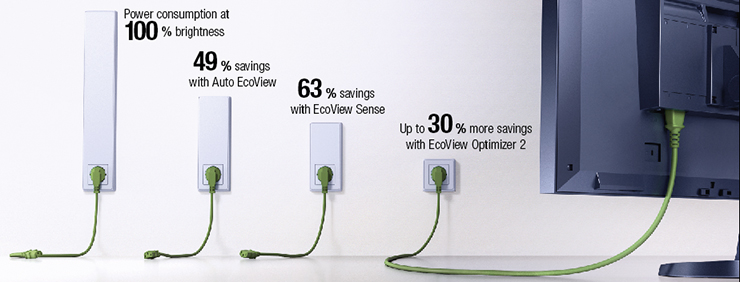
LED Backlights – Less Power, Longer Life
Compared to CCFL backlights, LED backlights last longer and consume less power. They are also mercury-free for minimal environmental impact.
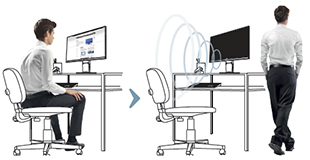
Presence Sensor for Energy Savings
A presence sensor called EcoView Sense prompts the monitor to switch to power save mode when you are absent and then power on again when you return. It even works in a multi-monitor setup so all monitors remain on when you're at your desk.
Reduce Power by up to 30%
A new feature called EcoView Optimizer 2 saves energy by up to 30% by reducing the backlight brightness and increasing the gain. To maintain image quality, EcoView Optimizer 2 only boosts the gain with a screen consisting mostly of dark content because the accompanying reduction in brightness is almost unperceivable.
ScreenManager Pro for Personal Settings
ScreenManager Pro lets users adjust color and EcoView settings with the mouse and keyboard instead of the on-screen display menu. It also offers multimonitor matching which allows adjustments to be applied to all FlexScan monitors connected to a single PC.
EIZO Monitor Configurator for Administrators
EIZO Monitor Configurator lets system administrators control the settings of all FlexScan EV monitors with a USB connection. The settings of one monitor can be saved as an xml file and can apply to other monitors via USB or office network.
Toote kirjeldus inglise keeles:
World’s Thinnest Bezels for Multi-Monitor Environments
The monitor features 1 mm ultra-slim bezels on the sides and top with black borders of 4.3 mm and a depth of a mere 47.9 mm. This makes for an attractive design that blends in with the desktop and reduces eye movement in a multi-monitor setup.
Clear View From All Angles
The monitor uses an LED-backlit IPS (in-plane switching) LCD panel with 178° viewing angle that minimizes color shift and contrast changes when viewing the screen at an angle.
Auto Brightness Control
To prevent eye fatigue, a brightness sensor called Auto EcoView detects the changes in the ambient brightness that occurs throughout the day and automatically adjusts the screen to the ideal brightness level.
Flicker-Free Images
Due to the way brightness is controlled on LED backlights, a small number of people perceive flicker on their screen which causes eye fatigue. The FlexScan EV series utilizes a hybrid solution to regulate brightness and make flicker unperceivable without any drawbacks like compromising color stability.
Less Blue Light Reduces Eye Fatigue
In the visible light spectrum, blue light has wave lengths adjacent to ultraviolet light. Compared to the factory preset setting of 6,500 K of typical LCD monitors, Paper Mode is closer to the spectral distribution with long reddish wavelengths so it reduces the amount of blue light, a cause of eye fatigue, and helps prevent eyestrain when reading documents.
Adjustable to Less Than 1% of Maximum Brightness
In a dimly-lit work environment, a monitor with low brightness settings is more comfortable to use. With its LED backlight, the monitor is adjustable to 1 cd/m²
which is less than 1% of the maximum.
LED Backlights – Less Power, Longer Life
Compared to CCFL backlights, LED backlights last longer and consume less power. They are also mercury-free for minimal environmental impact.
Presence Sensor for Energy Savings
A presence sensor called EcoView Sense prompts the monitor to switch to power save mode when you are absent and then power on again when you return. It even works in a multi-monitor setup so all monitors remain on when you're at your desk.
Reduce Power by up to 30%
A new feature called EcoView Optimizer 2 saves energy by up to 30% by reducing the backlight brightness and increasing the gain. To maintain image quality, EcoView Optimizer 2 only boosts the gain with a screen consisting mostly of dark content because the accompanying reduction in brightness is almost unperceivable.
ScreenManager Pro for Personal Settings
ScreenManager Pro lets users adjust color and EcoView settings with the mouse and keyboard instead of the on-screen display menu. It also offers multimonitor matching which allows adjustments to be applied to all FlexScan monitors connected to a single PC.
EIZO Monitor Configurator for Administrators
EIZO Monitor Configurator lets system administrators control the settings of all FlexScan EV monitors with a USB connection. The settings of one monitor can be saved as an xml file and can apply to other monitors via USB or office network.
Koos ostetud

TOP toode