Toote informatsioon
Xerox WorkCentre 3225DNI
Toote kirjeldus inglise keeles:
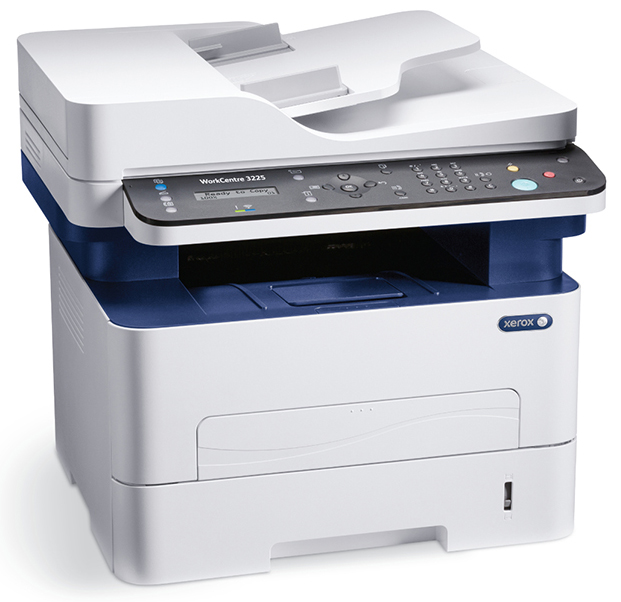
Budget friendly. Keep your costs down with fast, reliable printing for a single user or small team.
Count on it. Keep intervention to a minimum with long-lasting, easy-to-replace cartridges and reliable operation that handles every job with ease.
Print efficiently. Split supplies mean you replace only what you use – so you get the most out of every print cartridge.
Total peace of mind. Outstanding Xerox Service and Support, with a standard one-year warranty.
Quick printing. A print speed of up to 29 ppm and a rapid first page-out time as fast as 8.5 seconds enable you to spend less time at the device and more time focusing on your business.
Save more than money. Standard, automatic two-sided printing saves valuable time and paper. Power Save and Toner Save modes, and the Earth Smart print driver, let you choose to spend less on electricity and consumables.
Powerful and productive. The standard 256 MB of memory and the 600 MHz processor ensure jobs print quickly and accurately, even when loaded with graphics.
Visual impact. Printing at 4800 x 600 dpi enhanced image quality, together with PCL and PostScript emulations, ensures consistently clear text and sharp graphics.
Completely secure. A wide array of features ensures that private data remains secure, including SNMPv3 and IPv6 network security protocols, and Secure Fax Receive, which holds a fax until an authorized user logs in to retrieve it.
So many choices. Comprehensive copy features include reduce/enlarge, auto background suppression, 3-level darkness control, collation, ID card copy and N-up layouts.
It's not complicated. Position the multifunction printer anywhere it’s convenient; the Xerox® Easy Wireless Setup helps you connect quickly and easily to your Wi-Fi network.
Wi-Fi Direct. The WorkCentre 3225 multifunction printer can communicate with Wi-Fi-enabled devices without needing an existing wireless network. Wi-Fi Direct enables mobile phones, tablets and laptop computers to make a secure wireless connection directly to the printer.
Easy to reach. With quiet operation, built-in wireless networking and a compact design, the WorkCentre 3225 fits exactly where you need it to be most productive.
Color and black-and-white scanning quickly converts paper into electronic documents, ready to be saved to a network, desktop folder or inserted into an application.
Intuitive UI. The user-friendly front panel helps you find your most-used functions fast with easy-to-read buttons and two-line LCD display.
Scan to Email enables sending paper documents directly to email recipients from the front panel – no need to walk back and forth from the multifunction printer to your computer.
The 40-sheet Automatic Document Feeder saves time copying and scanning multiple-page documents.
Toote kirjeldus inglise keeles:
Budget friendly. Keep your costs down with fast, reliable printing for a single user or small team.
Count on it. Keep intervention to a minimum with long-lasting, easy-to-replace cartridges and reliable operation that handles every job with ease.
Print efficiently. Split supplies mean you replace only what you use – so you get the most out of every print cartridge.
Total peace of mind. Outstanding Xerox Service and Support, with a standard one-year warranty.
Quick printing. A print speed of up to 29 ppm and a rapid first page-out time as fast as 8.5 seconds enable you to spend less time at the device and more time focusing on your business.
Save more than money. Standard, automatic two-sided printing saves valuable time and paper. Power Save and Toner Save modes, and the Earth Smart print driver, let you choose to spend less on electricity and consumables.
Powerful and productive. The standard 256 MB of memory and the 600 MHz processor ensure jobs print quickly and accurately, even when loaded with graphics.
Visual impact. Printing at 4800 x 600 dpi enhanced image quality, together with PCL and PostScript emulations, ensures consistently clear text and sharp graphics.
Completely secure. A wide array of features ensures that private data remains secure, including SNMPv3 and IPv6 network security protocols, and Secure Fax Receive, which holds a fax until an authorized user logs in to retrieve it.
So many choices. Comprehensive copy features include reduce/enlarge, auto background suppression, 3-level darkness control, collation, ID card copy and N-up layouts.
It's not complicated. Position the multifunction printer anywhere it’s convenient; the Xerox® Easy Wireless Setup helps you connect quickly and easily to your Wi-Fi network.
Wi-Fi Direct. The WorkCentre 3225 multifunction printer can communicate with Wi-Fi-enabled devices without needing an existing wireless network. Wi-Fi Direct enables mobile phones, tablets and laptop computers to make a secure wireless connection directly to the printer.
Easy to reach. With quiet operation, built-in wireless networking and a compact design, the WorkCentre 3225 fits exactly where you need it to be most productive.
Color and black-and-white scanning quickly converts paper into electronic documents, ready to be saved to a network, desktop folder or inserted into an application.
Intuitive UI. The user-friendly front panel helps you find your most-used functions fast with easy-to-read buttons and two-line LCD display.
Scan to Email enables sending paper documents directly to email recipients from the front panel – no need to walk back and forth from the multifunction printer to your computer.
The 40-sheet Automatic Document Feeder saves time copying and scanning multiple-page documents.
Koos ostetud

TOP toode